android studio 3.0 前进和后退功能
使用android studio 3.0 开发Android程序时,需要用到前进和后退功能(跳到上一个源文件和下一个源文件)
快捷键是alt+Left 和alt+Right。
勾选view-->Toolbar 可以放到工具栏
使用android studio 3.0 开发Android程序时,需要用到前进和后退功能(跳到上一个源文件和下一个源文件)
快捷键是alt+Left 和alt+Right。
勾选view-->Toolbar 可以放到工具栏

通过DTU8 Debugger和LCD Image Assignment Tool,可以实现LCD仿真,这样可以很方便的调试程序。 如何实现LCD仿真,可以查看《LCD Image Tool User’s Manual》,文件名为:FEXTLcdImgToolU8_UM-07.pdf。这...
-- 老单增加自定义项选单条件,就是在下推时显示【没有符合条件的记录】,或在下游单据选单时在序时薄界面默认过滤条件单自据,这里以销售订单下推生成发货通知为例-- 步骤如下:-- 1、要用到的数据表有 -- ICTransactionType 该表反映了供需链所有单据的总体情况-- ICCl...

1、密勒定理 如图1所示的二端口网络(two-port network)中,Vin为输入电压,Vout为输出电压,Zf为Vin与Vout之间的桥接阻抗,A为Vin与Vout之间的闭环增益(A>0,正相放大;A<0,反相放大),且A的输入阻抗为无穷大,输出阻抗为零,则图1电路与图2电...

右击要设置的对象控件,点击“设置对象格式”,调出格式编辑器。点击“抑制显示”后面的编辑图标(见图红框处)。 在代码输入处输入以下代码: if 条件语句 then true else &n...
bos数据大量更改新增之后,会出现数据存放位置忘记的情况,下面为单据及单据转换后台查询对应模块的语句,如有需要可参考查询--自定义单据忘记存放在哪个模块可使用以下语句进行查询SELECT it.FID,it.FFunctionID as FSubSysID,it.FNa...
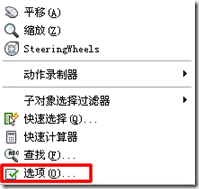
以前一直用AutoCAD2004,最近升级为AutoCAD2010,发现使用有些不同,尤其是一些设置,很难找到入口,所以也就不知从何设置。 一、AutoCAD2010更改图纸背景为黑色 AutoCAD2010默认图纸背景是白色,而之前大量的图纸都是在黑色背景下完成的。如果背景不更改为黑色,看起来很不...
